

Repository Browser
Ensure all required work in a release is completed by comparing branches or tags to see a list of files changed, associated issues, and code diffs.Git Commits Tab
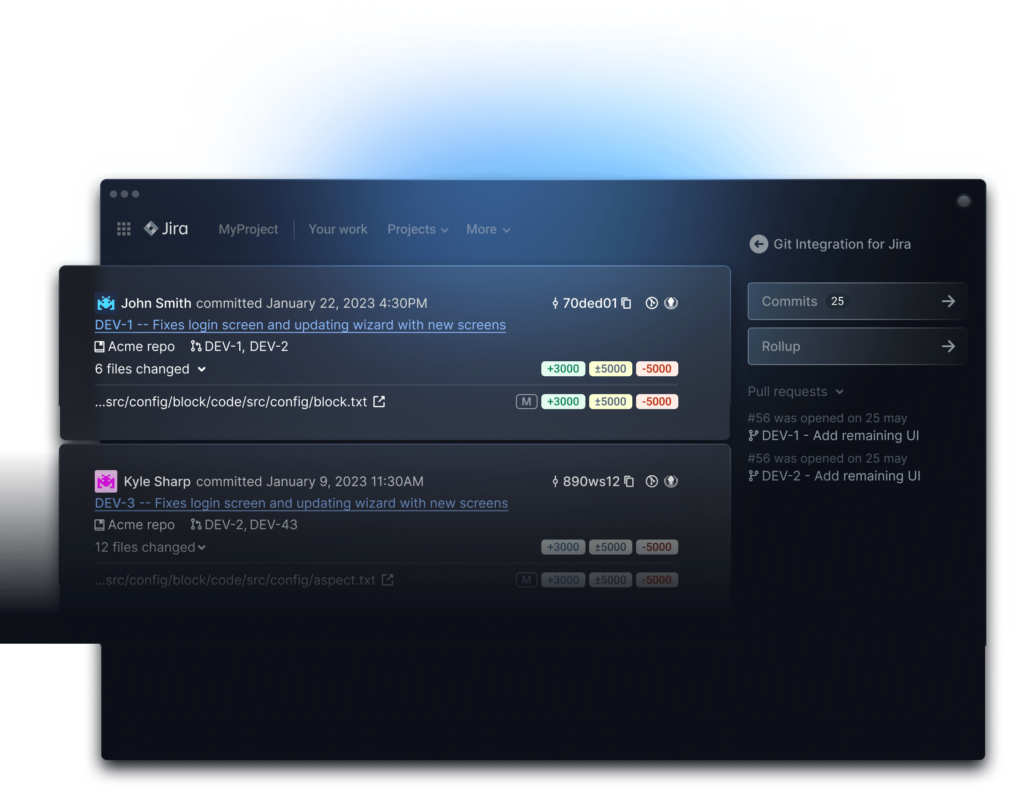
See full commit info including author, message, IDs, and code diff.Git Rollup Tab
Easily track progress with a summary view of commits including code and author statistics.Activity Timeline
Quickly track progress against plan and spot risks by viewing Jira + Git user activity across projects, epics, and sprints.Repository Browser
Ensure all required work in a release is completed by comparing branches or tags to see a list of files changed, associated issues, and code diffs.Repository Browser

Explore the work done in a repository, directly from Jira. The Repository Browser allows you to select any connected repository and view a rollup of contributors, volume of code changed, files changed, affected Issues, and more.
By comparing branches or tags, you can dissect the data in smaller pieces. This is useful to confirm which Issues are included in a particular release, or to get a snapshot of how much work was performed. You can even scan Diffs for all of the included files.Git Commits Tab
See full commit info including author, message, IDs, and code diff.Git Commits Tab

The Git Commits Tab is an easy way to scan the commit activity of a particular Jira Issue. This includes a full list of the commits that were made, the author, lines of code changed, and links out to Git.
Git Rollup Tab
Easily track progress with a summary view of commits including code and author statistics.Git Rollup Tab

Where the Git Commits Tab takes an individual view of commits, the Git Rollup Tab is a great way to see a summary of all of the commits made on an Issue. You can see aggregate data by developer and a list of all of the files that were changed.
Activity Timeline
Quickly track progress against plan and spot risks by viewing Jira + Git user activity across projects, epics, and sprints.Activity Timeline

When executing development plans, issue status never tells the whole story. So you probably end up opening up issue after issue to review activity. But that’s inefficient and doesn’t help you identify trends.
With Team Insights for Jira (a free extension), you can easily scan multiple issues at a time and get a summary of daily activity – without clicking into every issue. Quickly identify if team members are overloaded or if work is at risk for an upcoming deadline. And spot trends like stale issues, issues that revert in status, or pull requests that remain open for too long.Create Branch / Pull Request
Save time by creating linked branches and PRs directly from a Jira issue.Smart Commits
Reduce administrative work by updating Jira issues from commit messages.Web Linking
Use contextual links to navigate to your Git web interface from associated Jira issues.Deep Linking
Easily open commits in GitKraken Client and GitLens.Code Diff
Perform lightweight code reviews by viewing code diffs without leaving Jira.Create Branch / Pull Request
Save time by creating linked branches and PRs directly from a Jira issue.Create Branch/Pull Request

When you’re assigned some work and open up Jira, wouldn’t it be nice to immediately kick off your workflow? From any Issue, you can quickly create a branch that gets automatically associated with the Issue.
When work is completed and ready for review, make a Pull Request from the same spot.Smart Commits
Reduce administrative work by updating Jira issues from commit messages.Smart Commits

No one likes having to open up Jira to manually update Issues. Using Smart Commits, developers can continue using the tools they love, while simultaneously updating Jira so project managers can make decisions and move items through the workflow. It’s as simple as adding #comments, #time, and #transition to Git commit messages.
Web Linking
Use contextual links to navigate to your Git web interface from associated Jira issues.Web Linking

Hunting down commits and pull requests can feel like a waste of time. With Web Linking, any Git activity on an Issue has a link to the branch, commit or pull request. This takes you right into GitHub, GitLab, or any repository hosting service you’re using.
Deep Linking
Easily open commits in GitKraken Client and GitLens.Deep Linking

We’re on a mission to make life easier for developers and reduce context switching. Using our Git GUI, GitKraken Client, or VS Code add-on, GitLens, will help you stay in your flow.
Just like Web Linking, each Jira Issue will have contextual links out to where you manage your source control and perform your work. Easily bounce between Git, your IDE, and Jira without losing context.Code Diff
Perform lightweight code reviews by viewing code diffs without leaving Jira.Code Diff

If you’re connecting Git and Jira, you should have access to review code, right? Perhaps it’s a quick look to help out a team member who’s stuck, or maybe a small change that needs to be reviewed before it’s merged. In any case, simply open the Diff right from the Jira issue and scan away.
Issue Development Tab
Keep track of progress by viewing branches, commits, pull requests, and tags in Jira Issues.Workflow Automation
Keep Jira up to date and your team informed by automatically performing Jira actions based on Git activity.JQL DevOps Search
Easily search and find Jira issues based on Git activity.Builds and Deployments
See when an issue is included in a build or deployment with the free CI/CD for Jira Cloud extension.Issue Development Tab
Keep track of progress by viewing branches, commits, pull requests, and tags in Jira Issues.Issue Development Tab

Keeping your teams in sync and working in harmony requires access to the same information. When product managers can see Git activity, they no longer need to rely on the Jira issue status that could be misleading.
All development stakeholders in Jira can see branches, commits, pull requests, tags, and more from within the context of an Issue. See who did what, and when. Easily spot work that’s off track (e.g. upcoming due date with no commits) or mislabelled (e.g. not started status but has a pull request).Workflow Automation
Keep Jira up to date and your team informed by automatically performing Jira actions based on Git activity.Workflow Automation

How does less manual work and more reliable data sound? With Workflow Automation it’s possible. Set up rules that automatically make changes in Jira when development activities occur. Transition issue statuses, email team members, send Slack messages, and more based on your teams’ activity.
For example, rules can trigger when commits are made, or a pull request is merged. This puts less of a burden on developers to perform administrative work while simultaneously giving other stakeholders better confidence in what they’re seeing.JQL DevOps Search
Easily search and find Jira issues based on Git activity.JQL DevOps Search

Sometimes it can be difficult to find specific Jira issues or figure out what needs immediate attention. Using Jira’s advanced searches with JQL, you can find issues based on specific development activity. Perhaps you want to find a list of all Issues with an open pull request, or those that have an upcoming due date with no commits made. Simply type up your query and take action.
Builds and Deployments
See when an issue is included in a build or deployment with the free CI/CD for Jira Cloud extension.Builds and Deployments

Giving stakeholders visibility into work in progress is critical, but what about once that work is done? It’s just as important for team members to know an Issue has been included in a build and ultimately deployed to production.
CI/CD for Jira is a free extension for Git Integration for Jira (Cloud) that provides this complete view. The app unlocks the ability to see build and deployment info on Issues, as well as use it in Workflow Automation and JQL searches. Plus, you can see deployments plotted across a timeline.Repository Hosting Integrations
Integrate with cloud or self-hosted GitHub, GitLab, Azure and other major providers.Authentication Options
Utilize OAuth, PATs, or Webhooks to manage your integration.Enforce Git Server Permissions
Ensure only authorized users can see repo data in Jira.Webhook Indexing
Use webhooks to keep Git and Jira data synced in real time.Manage Integrations and Repositories
Enable Admins with full control of how the app behaves.Repository Hosting Integrations
Integrate with cloud or self-hosted GitHub, GitLab, Azure and other major providers.Repository Hosting Integrations

Git Integration for Jira provides a wide range of support. We offer out of the box connectivity for major providers but also have the flexibility to connect to any Git repository (e.g. plain Git). And if your organization is using multiple providers, it’s all managed from the same application. Setup is quick and easy, and Jira admins get full visibility into status and activity.
Authentication Options
Utilize OAuth, PATs, or Webhooks to manage your integration.Authentication Options

Enforce Git Server Permissions
Ensure only authorized users can see repo data in Jira.Enforce Git Server Permissions

Webhook Indexing
Use webhooks to keep Git and Jira data synced in real time.Webhook Indexing

Git Integration for Jira reindexes your repositories on a set cadence. However, with Webhook Indexing, Git data in Jira can be kept up to date in real time. Each time an relevant action is performed in Git, the webhook will trigger an update for that particular action and Issue. This ensures that whenever a stakeholder is looking at data in Jira, they know it’s up to date.
Manage Integrations and Repositories
Enable Admins with full control of how the app behaves.Manage Integrations and Repositories

We understand that customization and control is a big reason that customers choose Git Integration for Jira. Each organization is different and has certain preferences and default values they would like to work with. Jira Admins can enable and disable certain features, enforce rules, and set project-wide defaults. Individual users can also configure their default repositories and branches, plus set up their PATs.